

11 Email Flows Every eComm Brand Needs (You’re Probably Missing 3)
(Step-by-Step Guide for 2026)
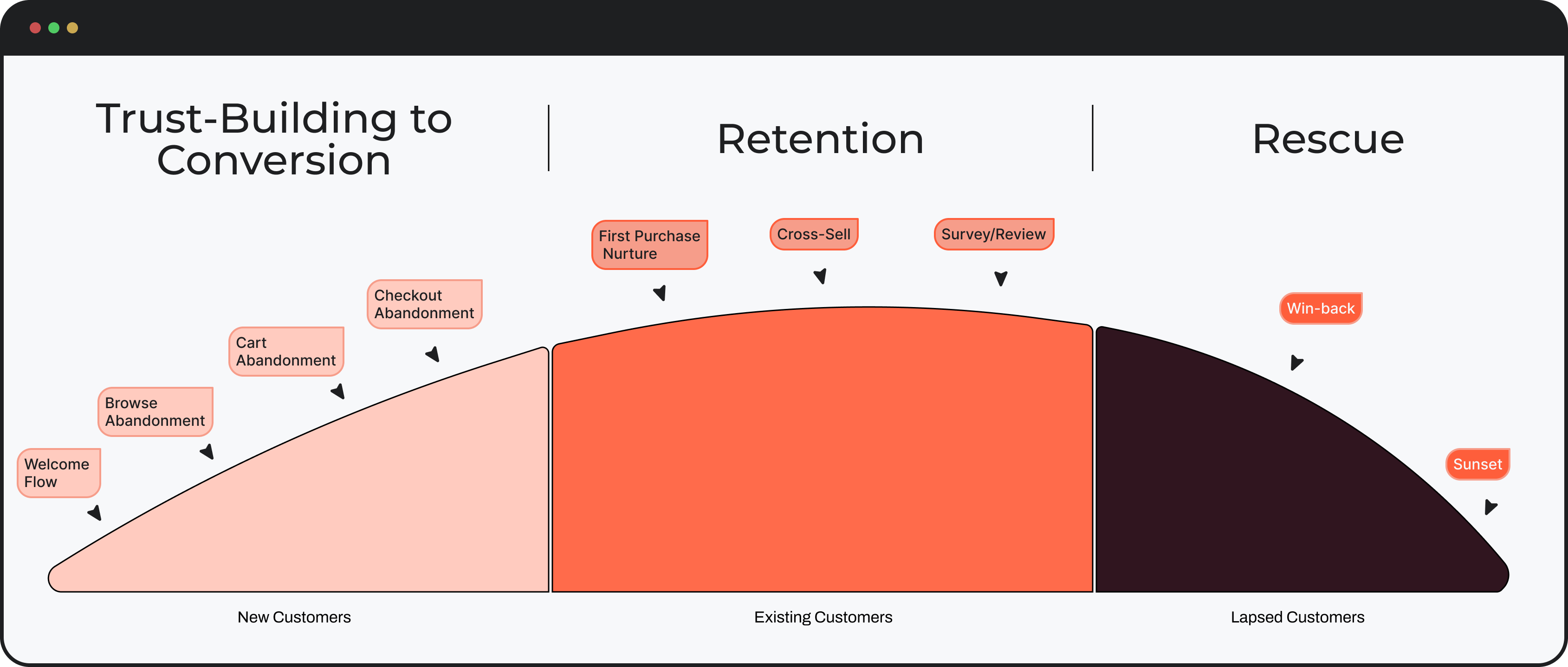
11 Email Flows Every eComm Brand Needs (You’re Probably Missing 3)
Set these flows up properly and unlock 30-50% more revenue from email
Step-by-step breakdown for scaling eCommerce brands.
Real Results From Automated Flows
This isn't theory. These are real stores running the exact system you're about to learn.


This Is For You If…

This training will cover:
- Technical knowledge of how Klaviyo's flow builder works.
- How to set yourself up for Klaviyo flow success.
- The 10 core emails flows that every brand needs.
- The exact emails to include in every single flow with breakdowns.
- Visual examples of what these email should look like.
- Where and WHY to feature plain text emails within email flows.
- Bonus: How to make these flows CRUSH IT for your store fixing your branding…
11 Core Email Flows…

Why listen to me?
Why listen to me?
I’m Nate, and I’ve been running email and SMS marketing for the past 7 years, working with fast-growing eCommerce brands.
Over that time, I developed a system called Emotional Targeting.
Which focuses on using brand and customer psychology to make your emails more engaging…
So you’re not relying on discounts to drive revenue.
If you want to learn more, subscribe to the channel.
And if you’re running an eCommerce brand doing over 20k per month
And want to stand out from competitors and build a brand people actually want to buy from
Click the first link in the description to book a call with me and my team.
Let's get some technical stuff out the way…
5 Klaviyo Concepts You Must Understand First
Before building any flow, you need to understand these five fundamentals. They are the foundation of every automated sequence.

What is a flow trigger?

Everything starts with the trigger.
A flow trigger in Klaviyo is what starts the entire flow.
It’s an event or action, like someone starting checkout or placing an order, that automatically kicks off a series of emails or SMS messages.
What is a Trigger Filter?

Now, on top of that, you have something called a trigger filter.
This acts like a gatekeeper.
Even if someone triggers the flow, the filter decides whether they should actually enter it.
For example, you might have a checkout started flow:
But only allow people with a cart value over $100 to enter.
This helps you control who receives what, based on specific behavior.
What is a Profile Filter?

Next, you have profile filters.
These don’t control who enters the flow…
They control who receives specific messages within the flow.
So instead of sending the same email to everyone, you can tailor messages based on things like location, purchase history, or customer attributes.
Profile filters allow you to create more targeted and personalised content for each recipient.
What is a flow Time Delay?
Then you have time delays.
This is what controls when your messages are sent.
It simply pauses the flow for a set period before the next message goes out—
Allowing you to space your emails in a way that feels natural, not overwhelming.
What is a Trigger Split?

A trigger split creates different paths in your flow based on the initial trigger.
So depending on what action someone took, they’ll go down a different path with different messaging.
What is a Conditional Split?

And finally, conditional splits.
This is where things get more advanced.
A conditional split lets you branch your flow based on customer data or behavior.
So instead of one-size-fits-all messaging
You can send completely different emails to high spenders, loyal customers, or low engagement users.
Flow Map of the 11 flows we'll cover + emails

Flow 1: Welcome Series
Your brand's first impression. A 4-email sequence for new subscribers who haven't purchased yet.

What is the Welcome Series flow?
The Welcome Series is the first point of contact a new subscriber has with your brand via email.
It's like the digital equivalent of someone walking into a store front and being greeted by drop dead gorgeous, pleasant, well spoken sales rep.
Usually, the Welcome Series features a discount or a special offer that they opted in to receive
Your Welcome Series is where you want to educate and nurture the customer by sending them a sequence of emails with goal of helping them make a buying decision.
Note: this flow is for new site visitors who have NOT yet placed an order.
This is the sequence of emails that the profile receives immediately after opting into your popup.
Trigger
- Added to your main list within Klaviyo/The list you popup is connected to (usually its your Newsletter list)

Trigger Filters
- Placed order 0 times since starting this flow
This ensures that anyone who places an order will be removed from the flow
Profile Filters

Copy/Paste to your Klaviyo account:
Placed Order Zero times since starting this flow
AND
Bounced Email= 0 since starting flow
AND
Marked email as spam = 0 since starting flow
AND
Clicked email to unsubscribe since starting this flow
That last one matters a lot. These are high-intent emails. You usually do not want Klaviyo suppressing them because the subscriber got another email recently.
Re-entry: usually off
Turn off Smart Sending on these emails so subscribers don’t get skipped
Welcome Email #1:
So how do you create your first welcome email?
In this email, we’ll highlight:
- Hero Section: Welcome the customer with a quick brand introduction and immediately present the incentive. Make the offer clear, visible, and easy to understand right away.
- Offer Visibility: Ensure the discount/code is prominently displayed and easy to redeem (We recommend using dynamic coupon codes, learn more in our Coupon code video) Reinforce how to use it with simple, direct instructions.
- Brand Introduction: Give a brief overview of who you are and what you sell, keep it concise and focused.
- Unique Differentiation: Highlight what makes your brand different (ingredients, materials, sourcing, production, etc.) to create instant perceived value.
- Brand / Founder Story: Share why the brand exists. This helps build an emotional connection and gives customers a reason to care.
- CTA: Include a clear call-to-action to shop and redeem the offer.
Example:

Welcome Email #2:
Comparison, differentiation, and objection handling
So how do you create this email?
In this email, we’ll highlight:
- Brand Story: Go deeper on why the brand exists. Share the founder’s story or the motivation behind creating the product—this builds emotional connection and trust.
- Quality & Standards: Highlight your unique quality standards (ingredients, materials, sourcing, production, etc.) to reinforce why your product is worth it.
- “Us vs Them” Table: Use a simple comparison table to visually break down the difference between your product and traditional alternatives. Keep it clear and easy to understand—this should feel obvious, not overwhelming.
- Risk Reversal: Remove hesitation with a guarantee or simple reassurance (e.g. “100% satisfaction guaranteed”).
- CTA: In the example below they have a "soft" CTA saying "Try Now" I'd recommend improving it with a slightly more enticing by including the offer (Try now with 10% off, Try risk free, Get now with free shipping etc)
Example:

Welcome Email #3:
Social proof, validation, and trust building
In this email, we’ll highlight:
- Social Proof: Lead with strong validation, customer reviews, testimonials, press mentions or UGC that show real people loving the product.
- Press & Media Mentions: Leverage any press features, awards, or social media recognition to build credibility and authority.
- Keep It Concise: This email should be short and to the point. Let the proof do the heavy lifting rather than over-explaining.
- Offer Reminder: Reinforce any active discount or incentive to keep urgency high.
- CTA: Include a clear call-to-action to shop and take advantage of the offer.
Example:

Welcome Email #4:
Community, Mission & Final Push
So how do you create this email?
In this email, we’ll highlight:
- Hero Section (Countdown): If this is the final email in your welcome series, lead with a countdown timer to create urgency and act as the main hook.
- Community: Showcase the community behind the brand—this could be customers, lifestyle, or shared values. Help the reader feel like they’re joining something bigger.
- Brand Mission: Reinforce what the brand stands for and what it’s trying to achieve. Keep it clear and meaningful.
- Founder Introduction: Introduce the founder(s) or team to humanize the brand and build a deeper connection.
- Offer Reminder: Bring back the discount or incentive and emphasize that it’s ending soon.
- CTA: Close with a clear call-to-action to shop before the offer expires.
Examples:

Flow 2: Abandoned Checkout

The Abandoned Checkout Flow is a series of emails designed to re-engage potential customers who have added items to their cart, gone to checkout but failed to complete the purchase.
This flow aims to encourage these "almost-buyers" to return to your site and finish their transaction.
This is by far, one of the most important flows within your entire setup.
These potential customers we're one step away from placing an order.
They are a "warm" as warm leads get.
Often, all this type of person needs is a well timed, well executed abandoned checkout email showing them the EXACT items that they took to checkout in order to make a buying decision.
Trigger:
- One thing I see a lot of brands fail to do, is make the distinction between the abandoned cart email flow and the abandoned checkout email flow.
- These are in fact two very different flows defined by the trigger and which stage someone reaches within the funnel.
- Very important to note, here we are talking about the "Checkout Started" trigger.

Trigger Filter:

Having these trigger filters means, anyone who placed an order will not receive this flow (very important) and if the customer goes back to checkout and doesn't place an order again, they won't re-enter the flow and receive the same emails, they will simple continue on receiving the subsequent emails in the flow.
Abandoned Checkout Email #1
In this email, we’ll highlight:
- Hero Section: Short header text
- Dynamic Product Block: Showcase the exact items left in their order using Klaviyo’s dynamic product block. This should be the main focus of the email.
- Keep It Concise: Keep the copy short and to the point
- Reviews/Testimonials
- CTA: Include a clear call-to-action to complete the purchase (e.g. “Finish your order” or “Complete your purchase").
-
Example:

Abandoned Checkout Email #2:
- Hero Section: Shift from a simple reminder to a more value-driven angle—start reinforcing why this product is worth it.
- Product Benefits: Clearly showcase the key advantages of the product the customer showed interest in. Focus on outcomes and what the customer gets.
- Differentiation: Explain what makes your product stand out from competitors. Highlight what’s different, better, or more effective.
- Offer: if possible throw in a discount to help tip an unsure customer over the fence.
- CTA: Include a strong call-to-action to complete their order.
Example:

Abandoned Checkout Email #3:
- Social Proof and Testimonials
- As always, include the dynamic product block to remind the customer of the items they left behind.
- Showcase relevant reviews and testimonials from satisfied customers.
- Choose testimonials that highlight the key benefits and unique selling points of the product.
- If available, include photos of the customers alongside their testimonials to add authenticity and build trust.
Example:

Abandoned Checkout Email Timing:
- Email #1: Sends 2 hours after trigger
- Email #2: Send 1 day after Email #1.
- Email #3: Send 1 days after Email #2.
A/B test is key!
PRO TIP: AB test these times (i.e 1-hour VS 2-hours) on the first email and the rest of the emails but keep in mind to test one thing at the time
Want my AI prompts to write your flows in seconds? 👇
Flow 3: Abandoned Cart
The twin brother of the abandoned checkout flow, this catches a potential buyer in a less "ready" stage of the customer journey where they added an item to cart BUT they haven't started a checkout yet.

The abandoned cart flow…or what I like to call "the missing flow from almost every Klaviyo account".
Most brands think they have this set up…
But in reality, they’re running an Abandoned Checkout flow.
And these are not the same.
The core difference comes down to the trigger:
“Added to Cart” vs. “Checkout Started.”
Two completely different stages of the funnel.
The cart stage happens before the customer even reaches checkout:
Which means you’re capturing intent earlier.
This is a high-impact flow, and if you’re not using it, you’re leaving a significant amount of revenue on the table.
Implementing an abandoned cart flow allows you to reach every customer who adds a product to their cart but never makes it to checkout
As long as you have their information in Klaviyo.
Now, one important thing to note:
The “Added to Cart” trigger doesn’t automatically sync with Klaviyo like most other events.
It requires a manual setup
Which is exactly why most brands skip it.
That said, Klaviyo has made this process fairly straightforward.
I’ll link their setup guide below so you can get this implemented properly.
How to create an "Added to Cart" event for Shopify | Klaviyo Help Center - Klaviyo Help Center
Do this before anything else.
The actual content of an Abandoned Cart flow is very similar to that of the Abandoned Checkout flow.
We follow pretty much the same structure but do a bit more selling than the Abandoned Checkout flow.
These people are still warm, but not as warm as the Abandoned Checkout recipients. They haven't yet gone through to the checkout stage.
Trigger:

Trigger Filter:

- Having these trigger filters means, anyone who went a step further and started checkout will not receive this flow (very important) and if the customer goes back to their cart and doesn't place an order again, they won't re-enter the flow and receive the same emails. Also anyone who places an order will be removed from the flow.
Abandoned Cart Email #1:
Above the fold section:
- Header: Keep it simple and clear.
- Dynamic Product Block: Use Klaviyo’s dynamic product block to display the exact items left in the customer’s cart.
- Copy: Keep messaging minimal, this email should act as a quick reminder, not a full sales pitch.
Pro Tip:
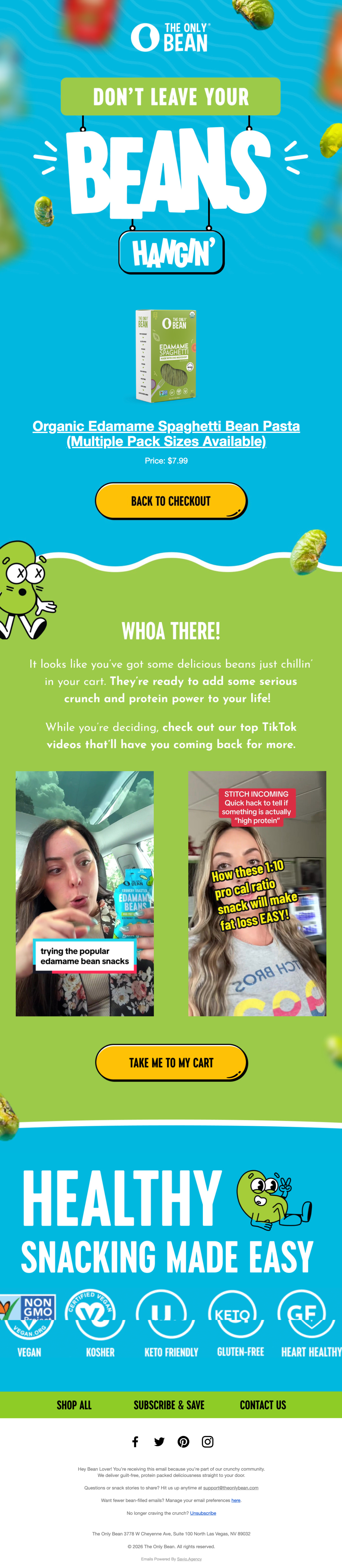
Let your customer reviews do the heavy lifting. Incorporate strong social proof, especially video reviews (We put GIFs in the example below since you can't embed videos in emails 🥲 but it does the trick ) This will help you build trust and nudge the customer back to complete their purchase.
Example:
Abandoned Cart Email #2:
- Unique Benefits / Testimonials Email
The goal of this email is to clearly communicate why your product is superior to other options on the market.
You can approach this in two ways:
- Benefits-Driven Angle: Highlight the unique advantages of your product: what it does better, differently, or more effectively than competitors.
- Social Proof Angle: Showcase customer reviews, testimonials, or real results to build trust and credibility (let them do the talking)
In this email, you can lean more into selling, going deeper on the specific product the customer was browsing to address objections and push them toward conversion.
Example:

Abandoned Cart Email #3:
- Hero Section: Feature a countdown timer or bold messaging that emphasizes the maximum discount available. This should be the focal point of the email, designed to drive immediate conversions.
- Dynamic Product Block: Follow with personalized product recommendations, as usual.
- Social Proof: Reinforce the offer by showcasing relevant reviews and testimonials to build trust and validate the purchase decision.
Example:


Abandoned Cart Email Timing:
- Email #1: Sends 30 minutes after trigger
- Email #2: Send 1 day after Email #1.
- Email #3: Send 2 days after Email #2.
Flow 4: Browse Abandoned Flow

Now let’s talk about browse abandonment.
This flow targets people who didn’t just land on your site and leave (Site Abandon)
They actually viewed specific product pages before dropping off.
Which means there’s already some level of interest there.
Because of that, you can tailor your emails around the exact products they were looking at.
This is your chance to bring them back and reignite that initial curiosity.
And this is really where the power of this flow comes in
You’re not guessing what they want… you already know what caught their attention.
So you can make your follow-ups much more relevant and personalised.
Now, even though you can be more targeted here compared to something like a site abandonment flow—
You still want to be mindful of how often you’re emailing.
Around 3 emails is a solid starting point.
And since these users have engaged more deeply with your site, you can lean a bit more into personalisation
Things like using their first name, or referencing the exact products they viewed.
Trigger:

Profile filters:

This ensure that if they Add to Cart, Start Checkout OR place an order, they will not receive these flow emails..
Browse Abandoned Email #1:
- So how do you create this email?
In this email, we’ll highlight:
- Hero Section:
- Header text - 3-5 words
- Dynamic Product Block: Showcase the exact product they viewed using a dynamic product block. This should be the main focus of the email.
- Light Messaging: Avoid heavy selling. This email should feel like a gentle nudge rather than a push.
- Product Benefits / Mechanism: Briefly highlight your unique mechanism or key benefits (e.g. “3 ways this helps improve sleep”). Keep it quick and easy to scan.
- “Need Help?” Section: Add a support-driven section to answer questions or reduce friction (FAQs, contact support, etc.).
- CTA: Include a clear call-to-action to return and continue browsing.
Example:

Browse Abandoned Email #2:
- So how do you create this email?
In this email, we’ll highlight:
- Hero Section:
- Dynamic Product Block: Continue showcasing the product(s) they browsed to keep the email relevant and personalized.
- Value Add: Go beyond a simple reminder, add useful content that helps them make a decision (testimonials, product education, quizzes, blog content, etc.).
- Objection Handling: Start addressing the reasons someone might hesitate to take the next step. This could include questions around shipping times, returns, pricing, or product effectiveness. Keep it clear and reassuring.
- Social Proof: Reinforce trust with reviews, testimonials, or real customer experiences.
- CTA: Include a clear call-to-action to bring them back and continue their journey.
Example:

Browse Abandoned Email #3:
- FAQs
So how do you create this email?
In this email, we’ll highlight:
- Hero Section: We want to switch things up a bit here and use an FAQ angle
- FAQs: Introduce a set of commonly asked questions about the product or brand. Focus on the questions that typically hold customers back from moving forward.
- Objection Handling: Use these FAQs to clearly address concerns around things like effectiveness, usage, shipping, returns, or results, especially important for health products or anything solving a unique problem.
- Clarity & Reassurance: Keep answers concise, easy to understand, and reassuring. The goal is to remove any remaining uncertainty.
- Support Angle: Position the brand as helpful and transparent, this builds trust and lowers resistance.
- CTA: Include a clear call-to-action to return to the product and complete the next step.
Example:

Abandoned Browse Email Timing:
- Email #1: Sends 2 hours after trigger
- Email #2: Send 1 day after Email #1.
- Email #3: Send 2 days after Email #2.
Want my AI prompts to write your flows in seconds? 👇
Flow 5: Site Abandoned Flow

This flow is a hidden gem for DTC brands. It's powerful, yet often overlooked.
The site abandoned flow targets the coldest type of visitors. These are people who land on your site, don't click on any products, and bounce off quickly.
Why is it so effective? It lets you send broad, general content to these casual browsers. It's your second chance to make a first impression.
But, you can only trigger this flow if you have the visitor's contact info.
Use this flow to showcase your brand's personality.
These visitors didn't stick around long, so make it count.
It catches those who might have been interested but got distracted.
Think of this flow like a retargeting campaign on Meta.
Don't go too deep or send too many emails with this flow. The last thing we want to do is spam customers with 10 emails after they literally just clicked onto the site.
We also don't want to spook our customers by getting hyper specific on the copy (eg. no first name fields).
Remember, these customers just clicked on the site and did nothing else. Two emails MAX here is best.
The goal should be to re introduce them to the brand and make some targeted recommendations.
Trigger:

Trigger Filter:

This stack here ensure that the only profiles that are receiving this flow is anyone that came to the site and did not take another action. Anyone that goes a step further will not get these emails. Also, this is not a flow you want to send over and over. I look at it as an opportunity to convert new customers once. We don't want to keep spamming the same profiles with the same flow. The filter "has not been in this flow at anytime" ensures that.
Email #1:
- General brand summary:
- Have a simple message up the top that acknowledges their browsing session
- You might want to re-introduce the brand and list out the core selling propositions.
- Have a best sellers section on there showing your most popular products enjoyed by customers.
- Also, a plain text email can work great here too
Example:

Email #2:
- Unique benefits email
- The second email in this sequence is not always 100% necessary but, if you're finding the first email is performing well, it might be a good idea to add a second.
- In the second email, you do a little bit more direct selling. You want to educate the customer on the benefits of using your product over solutions that exist in the market.
- What makes you special?
Example:

Time delays:
Send email #1 one hour after their browse session.
Send email #2 one day after email one.
Flow 6: Customer Thank You Flow

The customer thank you flow is the first point of contact you have with a customer, after they've just placed an order with your brand.
The goal of this flow is to, reduce buyers remorse, point the customer to relevant content about their product and provide updates before they receive their order.
it's essential for…
- Reducing support message
- Providing a positive customer experience
- Providing eduction around your customers' products.
Trigger:

Trigger Filters:
N/A
Customer Thank You Email #1:
- Send a warm thank-you message that includes links to crucial information and customer support. This shows appreciation and provides immediate value.
- Consider adding a "You Might Also Like" section featuring complementary products. Recent buyers are often more receptive to additional purchases, making this an ideal upselling opportunity.
- Provide a direct link to your order tracking page. This proactive step helps alleviate post-purchase anxiety and reduces the likelihood of customer service inquiries about order status.
Example:

Customer Thank You Email #2
- Specific instructions.
This here is a very straight forward and simple email and for some brands, it will be more relevant than others.
For each of our product types, we want to create an email that explains how to use the product and address FAQ's. This email works best to reduce support messages when sent before they receive their product.
Make sure the clearly list out the steps in a plain text email and address any issues the customer might run into. The reason to keep it plain text so that it's easy to follow.
There's a time and place for fancy designs but not in this case.
Example:

Customer Thank You Email #3:
- Join us on socials
In the third customer thank you email, we request that the new customer comes and follows our brand on social media. This is a great way to get the customer more involved with our online community.
Customers are people who are going to engage positively to social media content and are most likely to share your content. Make sure to tell them to follow!
Example:

Time delays:
Send email #1 immediately after purchase
Send email #2 one day after email one
Send email #3 two days after email two
Flow 7: Cross-sale/Up-sell series

The cross-sell flow is your opportunity to re-engage customers after they’ve received and experienced your product. This flow is triggered once the order is fulfilled and shifts the focus from delivery anticipation to maximizing customer lifetime value.
The goal of this flow is to introduce complementary products, reinforce your brand’s unique value, and convert satisfied buyers into repeat customers.
It’s a highly strategic flow that, while slightly delayed in timing, can become a strong revenue driver when executed correctly. It’s essential for…
- Increasing average order value through relevant product recommendations
- Reinforcing brand positioning and differentiation post-purchase
- Turning first-time buyers into repeat customers with timely incentives
- Re-engaging customers once they’ve had time to experience the product
Done right, this flow feels less like selling—and more like guiding the customer toward getting the most out of their purchase.
PRO TIP: This flow doesn’t work for every store. so disregard it if it doesn’t fit your business model.
i.e.:
- One-product stores with no natural add-ons or complementary items
- High-ticket, infrequent purchase products (e.g. furniture, luxury items)
- Brands with long repurchase cycles where cross-sell timing would feel forced
- Products that don’t require or benefit from additional items to enhance the experience
Trigger:
Fulfilled Order

Trigger Filters:

Cross-Sell Email #1: Your [Insert Product] Journey
Re-introduce the product they just purchased and guide the customer on how to get the best possible results from it. This helps reinforce their decision and builds confidence in their purchase.
Use this email to educate—share tips, usage instructions, or a simple “what to expect” timeline so they feel supported post-delivery.
Consider naturally introducing complementary products that enhance their experience. Position these as helpful additions rather than a hard sell.
Include a soft incentive (discount) to encourage a second purchase while engagement is still high.
Example:

Cross-Sell Email #2: Our Difference
Reinforce why your brand stands out and why they made the right choice. This is your opportunity to deepen brand affinity and build trust after the product experience has begun.
Highlight your unique selling points—ingredients, materials, process, mission, or results. You can also include reviews, testimonials, or social proof to validate their decision.
Subtly introduce additional products that align with your brand story and customer goals.
Include a clear CTA back to the store, paired with a discount to drive repeat purchases.
Example:

Cross-Sell Email #3: Claimed Your 10% Off Yet? (It’s the Last Day)
Create urgency by reminding the customer about their unused offer. This email is designed to convert hesitant buyers who didn’t act on previous emails.
Keep the messaging simple and direct—highlight the benefit, restate the offer, and emphasize that it’s expiring soon.
You can re-surface best-selling or complementary products to make the decision easy.
Use a strong, clear CTA and ensure the discount feels time-sensitive to maximize conversions.
Example:

Time delays:
Send email #1 fourteen days after fulfillment
Send email #2 one day after email one.
Send email #2 one day after email two.
Want my AI prompts to write your flows in seconds? 👇
Flow 8. Surveys
Trigger: it does require connecting your survey app
[ADD SCREENSHOT]
Post-Purchase Email #7: Got a Minute? We Could Really Use Your Help
Send: After cross-sell sequence completion
Offer: No discount (optional incentive)
This email is designed to gather valuable customer feedback and insights after they’ve had time to fully experience your product.
Position the request as a favor, keep it human, simple, and appreciative. Customers are far more likely to respond when they feel their opinion genuinely matters.
Link out to a short survey (Shopify app or Google Form) and keep it quick to complete (ideally under 2 minutes).
Use this data to improve your product, messaging, and overall customer experience. This email isn’t about revenue. it’s about learning directly from your best customers.
Example:

Send email #1 thirty days after fulfillment
Flow 9. Review request
Trigger: This requires connecting your review request app. We use Judge.me 90% of the time since it is very affordable ($15/month) compared to Klaviyo Reviews (which can cost a few hundred dollars per month).

Trigger Filters:
N/A
Post-Purchase Email #8: Want a Free $10 Gift Card to Our Store?
Send: 2–3 days after previous email
Offer: $10 gift card incentive
This email is focused on collecting high-quality user-generated content in the form of video reviews.
Offer a clear incentive (e.g. $10 gift card) in exchange for a quick video testimonial. Frame it as a win-win—the customer gets rewarded, and your brand gets authentic content.
Keep instructions simple: explain what to say, how long the video should be, and how to submit it (via Klaviyo Reviews or a Shopify app).
Video reviews can significantly increase conversion rates across your site and ads, making this one of the highest-leverage emails in your post-purchase flow.
Example:
Send email #1 fourty days after fulfillment
Post-purchase (1st-time) entire sequence

Want my AI prompts to write your flows in seconds? 👇
Flow 10: Win-Back Flow
- Function: Encourages lapsed customers to make another purchase with special offers.

The win-back flow is designed to re-engage past customers who haven’t purchased in a while. This is your opportunity to bring previously interested buyers back into your ecosystem and turn them into repeat customers.
The goal of this flow is to remind customers why they bought in the first place, reintroduce your products, and give them a compelling reason to return.
This flow can become a strong revenue driver when executed correctly, especially for brands with shorter repurchase cycles. It’s essential for…
- Recovering lost revenue from inactive customers
- Increasing customer lifetime value without acquiring new customers
- Rebuilding brand awareness with past buyers
- Encouraging repeat purchases through timely incentives
Done right, this flow feels like a well-timed nudge, not a desperate attempt to win the customer back.
PRO TIP: This flow doesn’t work for every store, so disregard it if it doesn’t fit your business model.
i.e.:
- Brands with extremely long purchase cycles (e.g. mattresses, high-ticket furniture)
- Products that are typically only bought once
- Stores without clear repeat purchase behavior or replenishment patterns
Example:


Time delays:
Send email #1 seventy five days after fulfillment
Send email #2 five days after email one.
Flow 11: Sunset Unengaged Flow

This flow represents your final attempt to re-engage subscribers who haven't interacted with your emails in an extended period. It's a crucial flow for maintaining list hygiene and optimizing email costs.
The flow helps:
- Clean your email list of truly inactive subscribers
- Reduce costs by removing unengaged profiles
- Give subscribers a final chance to stay connected
- Maintain healthy email deliverability rates
Trigger: Added to inactive subscriber segment
Trigger Filters:
- Must have received at least 20 emails all-time
- No email opens in last 180 days
- No email clicks in last 180 days
- Can receive email marketing
- Profile property 'unengaged' is not true
- Has not opened email since starting flow
- Has not clicked email since starting flow
Sunset Email #1:
- Acknowledge their inactivity ("Long time no see")
- Keep tone warm and inviting
- Include simple call-to-action back to site
- Focus on engagement rather than sales
- Keep it simple and straightforward
Example:
.png)
[Simple CTA to website]
Sunset Email #2 (Send after 5 days):
- More direct approach about their inactivity
- Clearly state this is the final email
- Provide preference management options
- Include unsubscribe option
- Keep tone professional but friendly
Example:
.png)
Important Update:
We noticed you haven't engaged with our emails in quite some time. This will be our last message unless we hear from you.
Would you like to:
- Update your email preferences [Link]
- Stay subscribed (just open this email!)
- Unsubscribe [Link]
Pro Tips:
- Keep the flow short (2 emails) to avoid deliverability issues
- Tag profiles as 'unengaged=true' after 5 days of no engagement
- Create a separate segment for unengaged profiles
- Regularly suppress the unengaged segment (every 2-4 weeks)
- Monitor open rates closely as they'll typically be lower for this flow
Time delays:
Send email #1 five days after being added to the Unengaged Segment
Send email #2 five days after email one.
Next steps:
These are the 80/20 of email marketing.
Setting these up will immediately give you a boost in revenue…
But I want to make one thing clear.
There are a lot of videos on YouTube that show you how to build these flows…
But if you want to maximize their effectiveness
You need a strong brand behind them.
How well you understand your customer’s wants, needs, and fears…
That’s what actually drives results.
That’s why I developed the Emotional Targeting system together with a brand expert
A system designed to integrate branding into your email marketing…
So your flows don’t just send…
They resonate deeply and emptional with your subscribers and in turn, get more opens, clicks and sales.
If your store is doing over 20k per month, book a call below.
We’ll audit your numbers and your brand to help you maximize your email performance.
And subscribe for more content on turning Klaviyo into a real growth channel

